Assigning groups to one or more Subaccounts
The Group Permission tab/page is used to associate subaccounts to a
group. Users then can view documents associated with subaccounts other
than their own in the results list of a search in ISE. First, documents
are assigned to groups (see Adding,
editing, or removing Groups), and then Groups can be associated to
one or more subaccounts, which are subordinate accounts licensed to use
particular IHS products. Note that you can only associate a Group to a
Subaccount that already has access to Standards Expert.
If there is only one Group associated with a Subaccount, that Group
will automatically be attached to the Subaccount.
To add and remove permissions for access to publications
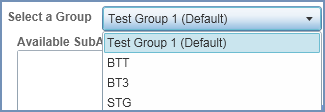
Select a group from the Select
a Group drop-down list.
Select an Available SubAccount in the left pane.
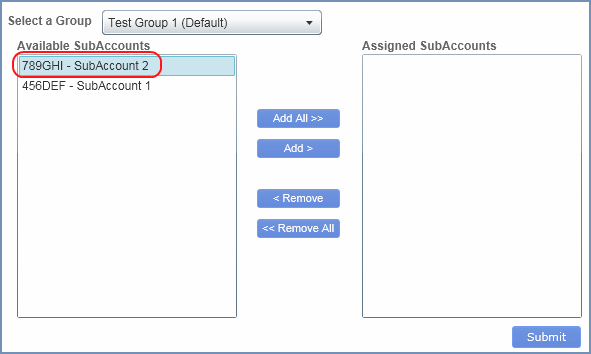
To move the selected subaccount to the Assigned
Subaccount pane on the right, click the Add
button in the center.
If you want to move all the subaccounts to the Assigned SubAccount
pane, click Add All.
The selected and moved subaccount is now assigned to Test Group 1 (Default).
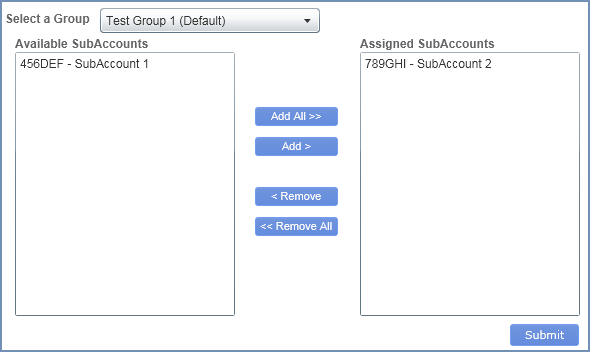
To remove the subaccount from the Assigned SubAccount
pane and move it to the Available SubAccounts pane to dissolve the association
with the selected Group (of documents), highlight the subaccount, and
then click Remove.
To remove all the subaccounts from the Assigned SubAccount pane to
the Available SubAccounts pane, click Remove
All.
Related Topics:
Managing
publications and permissions
Adding,
editing, and removing groups
Exporting
and/or deleting all publications